Get in touch with us today! Call us toll-free at 1.866.754.4111 or email us at [email protected]

Get in touch with us today! Call us toll-free at 1.866.754.4111 or email us at [email protected]

From in-context editing to robust features like eCommerce integration and secured file transfer, WebWiz@rd™ makes website management effortless.
In this guide, you'll explore why content management is critical for both SEO success and visitor engagement, and how WebWiz@rd™’s intuitive tools—from its WYSIWYG editor to banner management—simplify the process. Learn how our system can improve your digital presence, enhance user experience, and help your business thrive online.
Read on to see how WebWiz@rd™ can revolutionize your online strategy.
Schedule a demo today!
Discover how WebWiz@rd™, a proprietary content management system, can transform the way you manage your website. Designed with busy professionals in mind, this powerful CMS allows you to update content in real-time, without the need for a webmaster, saving you both time and money.
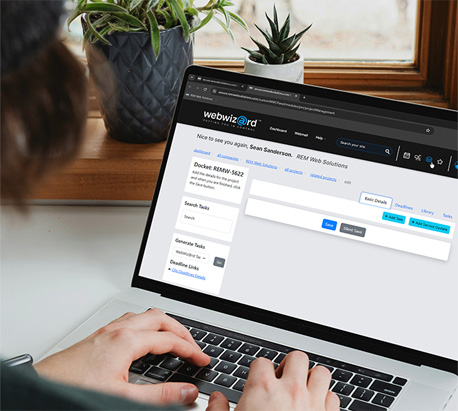
WebWiz@rd™ is our proprietary content management system designed to simplify website updates.
It offers features like a photo gallery, blog, and form builder, empowering users to manage content in real-time without needing a webmaster. With free updates for life, WebWiz@rd™ supports custom web design and lets you add unlimited content, ensuring your site stays fresh and aligned with your business identity.
Regular updates boost search engine rankings and keep visitors engaged.
Fresh content helps your site stay relevant, while outdated content can lead to higher bounce rates.

Your website will be built on WebWiz@rd 5, REM’s powerful, secure, and easy-to-use content management system made specifically for small and medium-sized businesses. This package gives you everything you need to manage your website confidently without relying on a developer for everyday updates.
Built for busy professionals, WebWiz@rd™ is easy to use, with an intuitive interface, WYSIWYG editor, and drag-and-drop functionality. You can update content instantly, with no technical skills needed. Features like in-context editing, guided workflows, and strong support ensure a smooth experience. Plus, safeguards like error prevention keep your site running smoothly. Here is a list of some of the key features:
WebWiz@rd™ features are the built-in tools and capabilities that power every website. These features enhance content management, SEO, performance, and usability, forming the foundation that supports all modules and ensures a flexible, scalable, and easy-to-manage website experience.

Easy-to-Use Navigation
Your site includes a clear, intuitive drop-down navigation menu designed to help visitors find information quickly and move through your site with ease.

Full CMS Control ( No Technical Skills Required )
WebWiz@rd gives your team complete control over website content through a secure, user-friendly CMS built for non-technical users.
User & Administrator Management
Add, modify, or remove administrators in a secure environment, giving you full control over who can manage your website.

Page Management
Create, edit, or delete pages at any time without developer support, allowing your site to grow and evolve as your business changes.

Flexible Content Editing
Add and update custom text, images, videos, and downloadable files directly within the CMS.
Media & Document Management
Upload, organize, and manage documents and media files from a centralized media library.

SEO & Meta Management
Manage meta titles, descriptions, and structured data to improve search engine visibility and control how your pages appear in search results.

Optimized for All Devices
Your website uses a responsive layout that automatically adapts to desktops, tablets, and mobile devices for a consistent, high-quality user experience on every screen.
WYSIWYG Editor
Edit content directly on the page using a simple, visual editor. Make real-time updates to text and layout without writing code or relying on technical expertise.
Complimentary Add-Ons
Your package includes additional tools and support to help you get started with confidence:
* Domain name renewals are billed annually (subject to change).
** All meetings take place online or at REM’s office unless otherwise arranged.
WebWiz@rd™ modules are flexible add-ons that enhance your website with advanced functionality, allowing you to customize and scale your site based on your specific business needs.
The Advertising Module allows you to sell ad space directly on your website, giving you a built-in way to generate recurring revenue while offering valuable promotional opportunities to your partners, vendors, or local businesses. This module handles the full lifecycle of banner advertising, from placement to performance tracking, right inside your WebWiz@rd™ CMS.
Up to 90 minutes of template layout customization.
We tailor the look and placement of your ad spaces to fit your website design and ensure the ads integrate seamlessly with your layout.
Integrated click and impression tracking
Every ad you place automatically records:
Total impressions (how many times the ad was viewed).
Total clicks.
Add, remove, and manage multiple advertisers.
Upload banner graphics (various sizes supported).
Set ad rotation rules or display one static ad.
Track clicks and impressions.
Export performance reports for advertisers.
Place ads in multiple areas of your site (header, sidebar, footer, etc.).
Create a new revenue stream by selling ad spots on your website.
Attract sponsors and partners with clean analytics and guaranteed visibility.
Maintain full control over ads without relying on external ad networks.
Keep your site organized by managing all campaigns from a single dashboard.
Increase engagement by promoting relevant offers to your audience.
Local businesses advertising on community or association websites.
Vendor partner promotions.
Event sponsorship banners.
Internal cross-promotion of services.
Non-profits seeking supporter advertising.
The Blog Module gives you a powerful, built-in publishing tool that makes it easy to share updates, publish articles, and build long-term SEO authority. Whether you're posting news, guides, announcements, or thought-leadership content, this module helps you keep your website fresh, active, and engaging without needing any technical skills.
Visitors can browse recent posts on your homepage (via an optional teaser widget) and access your full archive through a dedicated blog page with an easy “Show More” loading feature.
Up to 30 minutes of blog content design customization.
We match your blog post styling including headings, images, spacing, and typography to your website’s design for a clean, professional reading experience.
Up to 1 hour of template creation or customization.
We set up your blog layout, post styling, and listing/archive page so your content displays beautifully and consistently.
Optional blog feed widget.
A teaser block that can be displayed on your homepage or any other page.
Perfect for drawing visitors into your newest or most important posts.
Create and publish unlimited blog posts.
Add images, videos, links, and formatted content.
Automatic post archiving and “Show More” pagination.
SEO-friendly URL structure and meta tag controls.
Easy content editing through WebWiz@rd™.
Ability to schedule posts or save drafts.
Boost SEO performance with consistent, keyword-rich content.
Increase website traffic by sharing valuable information.
Build credibility as an authority in your field.
Keep your homepage fresh with the teaser widget showcasing your latest posts.
Improve user engagement by guiding visitors deeper into your website.
Easily manage content without relying on a developer.
Company news and updates
Educational articles or tutorials
Industry insights or thought leadership
Announcements and promotions
Non-profit updates, events, or impact stories.
Product information and feature spotlights.
The Careers Module gives you a dedicated area on your website to post job opportunities and collect applications. It helps streamline hiring while reinforcing your brand as a professional and desirable place to work.
Candidates can browse open roles, review job details, and submit applications directly through your website.
We configure the careers engine and align it with your site design.
Applications are submitted through structured forms tied to each job posting.
Post unlimited job openings.
Detailed job descriptions (WYSIWYG editor).
Employment type, location, and department fields
Resume and cover letter file upload support.
Automatic emails to specific addresses for notification of submissions.
Schedule postings to show up on a specific date and automatically be removed on expiry date.
Ability to mark positions as open or closed.
Archive filled roles without deleting history.
Centralize recruitment in one professional location.
Attract better candidates with a branded hiring experience.
Reduce reliance on third-party job boards.
Streamline hiring workflows with structured submissions.
Strengthen employer branding and culture messaging.
Growing businesses.
Multi-location companies
Retail and hospitality.
Manufacturing and logistics.
Non-profits and associations.
Seasonal or high-volume hiring environments.
The eCommerce Module transforms your website into a fully integrated online store, allowing you to sell products, manage orders, track inventory, and offer a seamless shopping experience across desktop and mobile devices. Built directly into WebWiz@rd™, this module gives you the flexibility and control of a modern eCommerce platform without needing external systems for basic functionality.
It is ideal for retail businesses, restaurants, specialty shops, and service-based organisations looking to expand their online sales channel.

Up to 8 hours of content design customization, including:
Embedded menu(s) & product search tools.
Product listing pages.
Category listing pages.
Product information (detail) pages.
Up to 4 hours of dedicated template design creation.
We design and integrate a branded eCommerce layout that aligns with your site’s visual style.
2 additional hours of eCommerce training.
Learn how to manage products, orders, customers, shipping, and promotions.
Google maps is used for autocompleting addresses when creating or managing ecommerce accounts. Requires a Google billing account.
Below is a complete breakdown of your eCommerce capabilities.
All features listed are included as part of this module unless noted otherwise.
Product Features
SEO-friendly naming.
Short teaser text.
Long WYSIWYG descriptions.
Assign products to multiple categories.
Customizable description fields.
Customizable input fields (e.g., sizing, personalization).
Keyword allocation for internal search.
Support for images, embeded videos, downloads, and external links.
Multiple SKUs per product.
Canada and USA shipping & taxation support.
Featured / New / Highlighted product designations.
Related product associations.
Optional customer reviews.
Category Features
SEO-friendly naming.
Short and long descriptions.
Category display images.
Filter visibility controls.
Multi-level menu structure (1–10 levels deep).
User Features
Standard contact, billing, and shipping profiles.
Full / Guest account designations.
Active / Inactive user status management.
Integrated Shipping Providers
Canada Post.
Purolator.
Ship Station (client responsible for their account fees and setup).
Additional Shipping Logic
Non-integrated, location-based shipping.
Set shipping rules per order or per product.
Order & Checkout Features
Full shopping cart functionality.
Canada and USA taxation calculations.
Automatic shipping calculations.
Payment options:
PayPal (client responsible for their account fees and setup).
Stripe (client responsible for their account fees and setup).
Call with Payment.
Mail Payment.
Pay at Pickup.
Customizable handling fee.
Processing time settings.
Automatic PDF receipt creation.
Email receipts sent to customers and store administrators.
Discount Types
Exact amount off entire order.
Exact amount off a single product.
Percentage off entire order.
Percentage off a single product.
Free shipping promotions.
Eligibility / Criteria Controls
Item found in cart.
Cart total dollar amount.
Number of items in cart.
Item price thresholds.
Included Reports
Detailed sales by product.
Summary of sales by category.
Summary of sales by customer.
SKU stock levels.
Promotion code usage summaries.
Sell products online 24/7, expanding your revenue opportunities.
Streamline operations by managing everything in one integrated system.
Improve customer experience with fast navigation, clean product layouts, and easy checkout.
Control inventory and fulfillment without external tools.
Gain insight into product performance and customer behaviour through reporting.
Scale your store by adding unlimited products, users, and categories as you grow.
The Events Module gives you a complete system for managing events, registrations, payments, and attendee information directly through your website. Whether you host workshops, classes, fundraisers, conferences, or community events, this module makes planning and promotion simple and professional.
Users can browse upcoming events, view details, register themselves or their group, select options such as meals or ticket types, and complete payment online.

We configure your events engine and set up your initial event layouts.
Optional “Mini Event Calendar” widget
Display upcoming events in a compact, eye-catching widget.
Google Mapping Tools integration
Requires an active Google billing account if you want to display map-based locations and directions.
Start & end dates and times.
Optional “all-day event” toggle.
Short text description.
Long WYSIWYG description.
Display image for stronger visual presentation.
Up to 3 price types (Standard, Alternate 1, Alternate 2).
Standard organizer contact details.
Google map integration for easy directions.
Customizable:
Categories
Event series information.
Customizable meal selections.
Single or group/party registration.
Maximum attendee limits.
Flexible payment options:
PayPal
Stripe
Call with Payment
Mail Payment
Pay at Door
Configurable registrant information collection (choose what data is required)..
Quick event cloning for fast duplication of similar events
Stores standard contact, billing, and shipping information based on event requirements.
Tracks paid vs. unpaid registrations.
Exact amount off entire order.
Percent off entire order.
Registration summaries per event.
Promotion code usage summaries.
Simplify event management with all registration and payment tools in one place.
Increase attendance through easy online sign-ups.
Improve user experience with a clear, searchable event directory.
Reduce administrative work by automating payments and data collection.
Build repeat events quickly with cloning tools and templates.
Gain insights into attendance, revenue, and behaviour with built-in reporting.
Classes, workshops, and training programs.
Conferences and seminars.
Fundraisers and galas.
Community events and festivals.
Sporting events or tournaments.
Faith or cultural organisation programming.
Membership or association activities.
Restaurant or hospitality events.
Municipal programming and parks & rec events.
The FAQ Module allows you to create, manage, and display frequently asked questions anywhere on your website. It’s designed to help visitors quickly find answers, reduce confusion, and remove common barriers to conversion without needing to contact your team.
FAQs can be displayed on dedicated FAQ pages or embedded directly into service pages, landing pages, or support sections.
We configure the FAQ system and ensure it integrates seamlessly with your site’s design.
Flexible display options
FAQs can be shown as:
Expandable accordion lists
Static question-and-answer blocks
Grouped sections by topic or category
Add and manage unlimited FAQ entries
Organize FAQs by category or topic
Display FAQs on any page or template
SEO-friendly content structure
Reusable FAQs across multiple pages
Answer common questions upfront, reducing email and phone inquiries
Improve user experience by removing friction and uncertainty
Increase conversions by addressing objections directly on key pages
Support AI-powered search and answer engines (AEO) with clearly structured information
Keep information consistent across your website
Empower your team to update FAQs anytime
Service explanations and pricing questions
Product or feature clarification
Booking, registration, or ordering processes
Shipping, returns, or policies
Membership or program details
Technical or support-related questions
The Form Builder Module gives you the flexibility to create custom forms of any size simple or complex directly within WebWiz@rd™. This module allows you to build, edit, and manage forms without needing a developer.
Forms can be placed on any page of your website, making it easy to convert visitors, gather information, and streamline your workflows.
We set up your initial form and ensure it’s connected properly to email notifications or any required workflows.
(Additional forms or custom logic can be added at our standard hourly rate.)
Add unlimited fields (text boxes, dropdowns, checkboxes, radio buttons, file uploads, and more).
Insert forms on any page using WebWiz@rd™’s content tools.
Customize email notifications for internal staff.
Store submissions for backup or reporting.
Add required fields.
Integrates with your site’s design for a seamless visual experience.
Capture more leads with forms placed strategically across your website.
Simplify data collection no coding required.
Improve user experience with beautifully formatted, mobile-friendly forms.
Streamline internal processes with automated notifications and organized submission data.
Build any form you need as your business grows contact forms, registration forms, surveys, event sign-ups, job applications, and more.
Contact forms and quote requests
Registration and sign-up forms
Surveys or feedback forms
Event or workshop applications
Job application forms
Donation or volunteer intake forms
The Full Text Search Module adds fast, accurate, sitewide search functionality to your website making it easier for visitors to find exactly what they’re looking for. Instead of browsing page-by-page, users can search keywords, phrases, or topics and instantly see relevant results pulled from your website’s content.
This is an essential feature for organisations with large sites, lots of resources, or users who expect quick access to information.

We integrate the search tool into your site’s design
Provides click-through links directly to results.
Automatically updates as new pages are added.
Works seamlessly with your WebWiz@rd™ content.
Improved user experience visitors can find what they want without hunting through menus.
More engagement by guiding users into deeper content.
Reduced support inquiries customers can self-serve information.
Stronger SEO signals as users spend longer exploring relevant pages.
Professional polish search functionality is expected on modern websites.
Content-heavy or information-rich websites.
Municipalities, non-profits, and associations.
Training centres, libraries, or service-based companies.
Businesses with large resource sections or FAQs.
Any organisation wanting a more intuitive browsing experience.
The Locations Module is designed for businesses and organisations with multiple physical locations. It provides a clean, searchable directory of your offices, stores, branches, or service areas making it easy for visitors to quickly find the location closest to them.
This module supports interactive maps, store details, hours of operation, and driving directions, creating a user-friendly experience that builds trust and improves accessibility.

We set up your initial location structure and ensure the layout matches your site’s design.
A powerful search tool that helps users filter and find locations based on their location, postal code, or name.
This lets you showcase your locations in the way that best suits your layout and content strategy.
Google Maps integration.
Clients must have an active Google billing account to use Google Maps tools.
This ensures accurate mapping, directions, geolocation, and long-term reliability.
Add unlimited locations.
Display address, phone number, hours, and custom descriptions.
Integrated Google Map for each location.
Click-to-open “directions” via Google Maps.
Optional filtering and search tools.
Improve user experience by helping visitors quickly find your nearest branch.
Increase foot traffic with easy access to maps and directions.
Strengthen brand credibility with a professional, organized directory.
Keep information consistent through centralized management in WebWiz@rd™.
Franchise or multi-location retail stores.
Medical clinics, dental offices, or wellness centres
Non-profit organizations with multiple chapters.
Municipal departments or public service locations.
Corporate offices and regional branches.
Service area or territory-based businesses.
Restaurants, cafés, or hospitality venues.
The Media Collections Module gives you a unified way to manage and display images and videos across your website. By combining banners, scrolling logos, and photo galleries into one flexible system, this module helps you capture attention, reinforce credibility, and tell your story through strong visuals.
Whether you’re promoting key messages, showcasing partnerships, or organizing image galleries, Media Collections provides a polished, professional presentation that works seamlessly across all devices.
Up to 30 minutes of layout and visual configuration
We style your media layouts to match your brand, colours, and page design so everything feels cohesive and professionally integrated.
(Additional design time or custom graphics can be added at our standard hourly rate.)
Banner and hero image support
Create static or rotating banners to highlight promotions, announcements, or key messaging above the fold.
Scrolling logos and image carousels
Display client logos, partners, sponsors, or featured images in smooth horizontal scrolling layouts. Options include clickable logos, custom ordering or randomization, and a clean, distraction-free presentation.
Unlimited photo galleries and collections
Create and manage unlimited image galleries with titles, captions, and descriptions.
Lightbox image viewing
Enable click-to-expand viewing so visitors can see full-size images in an elegant overlay.
Organized media management
Group images into collections, galleries, albums, or categories for easy organization and reuse.
Place media anywhere on your site
Banners, logo carousels, and galleries can be displayed on any page or template.
Instantly elevate your website with professional, high-impact visuals.
Promote key messages, campaigns, and announcements using banners and carousels.
Build trust and credibility with client logos, partnerships, and real-world imagery.
Keep your website fresh by updating visuals as your business evolves.
Improve user engagement with interactive, visually guided content.
Communicate your value proposition clearly through curated visual collections.
Homepage hero banners and rotating promotions.
Client, partner, sponsor, or association logo displays.
Product, service, or portfolio image galleries.
Event photos, team images, or facility showcases.
Before-and-after project galleries.
Non-profit programs, community initiatives, and impact stories.
Construction, renovation, landscaping, or creative work portfolios.
The Newsflash Module gives you a dedicated space on your website to highlight important announcements, urgent messages, or time-sensitive updates. This tool is perfect for drawing attention to information your visitors should not miss whether it’s a service alert, event notice, promotion, or policy change.
Designed to stand out visually, the Newsflash area helps you communicate quickly and effectively without altering your main page content.

We set up your Newsflash display area and integrate it into your chosen page template.
Add, edit, or remove news items instantly.
Ability to display one-time alerts or ongoing announcements.
Place the Newsflash area on multiple page templates.
Set publish/unpublish dates for time-sensitive messages.
Communicate critical information quickly (closures, outages, schedule changes, deadlines, etc.).
Keep your audience informed without changing your main homepage layout.
Improve trust and transparency by consistently sharing updates.
Drive traffic to important pages by linking directly from the announcement.
Service disruptions or maintenance notices.
Holiday hours or unexpected closures.
Urgent alerts or safety updates.
Time-sensitive promotions or sales.
Event reminders and registration deadlines.
“New feature” or “Now available” announcements.
The Newsletter Module allows you to easily create, send, and manage email updates directly through your website. It’s the perfect way to stay connected with your audience, share important news, promote products or events, and drive repeat engagement all without relying on third-party email platforms.
This module gives you the flexibility to manage subscribers, organize lists, and send professional-looking emails right from your WebWiz@rd™ dashboard.
We install and configure the module, ensuring it works seamlessly with your website and subscriber database.
Newsletter content design not included
Our team can design branded newsletter templates for you at a small additional cost if needed.
Build and manage subscriber lists.
Create newsletters directly inside WebWiz@rd™.
Easy content editor for text, images, buttons, and links.
Send newsletters to your full list or targeted sub-groups.
Built-in unsubscribe option for compliance.
View sending history.
Export subscribers for external marketing use.
Stay top-of-mind with customers, donors, members, or supporters.
Drive traffic back to your website with links to new pages or blog posts.
Increase engagement and repeat business through consistent communication.
Avoid expensive external tools manage everything from your own website.
Grow your audience with simple signup forms placed across your site.
Monthly company newsletters.
Promotions, sales, and product highlights.
Event reminders and follow-ups.
Non-profit updates, fundraisers, and impact stories.
Education or training updates.
Municipal or association announcements.
The Projects / Portfolio Module allows you to showcase completed work in a visually organized, professional format. It’s ideal for businesses that want to demonstrate experience, craftsmanship, and results through real-world examples.
Projects can be categorized, filtered, and displayed in galleries with detail pages making it easy for visitors to explore your work.
We configure your portfolio structure and match it to your site’s branding.
Projects can be grouped by service type, industry, location, or any custom category.
Add unlimited projects or portfolio entries
Categorize projects for easy filtering
Project detail pages with:
Images or galleries
Descriptions and highlights
Key outcomes or specifications
Featured project designations
Clean grid layout
Display projects on a dedicated page and homepage teaser for featured projects.
SEO-friendly structure.
Show proof of experience, not just claims.
Build confidence with prospective customers.
Differentiate your business from competitors.
Support sales conversations with real examples.
Improve engagement by giving visitors something tangible to explore
Construction and trades
Manufacturing and industrial services
Creative agencies and designers
Engineering firms
Consultants and professional services
The Secured File Transfer Area Module provides a simple, controlled way to share files with users through your website. It is ideal for organisations that need to provide documents, resources, or downloadable materials to specific groups such as clients, members, staff, students, or partners without making those files publicly accessible.
Users log in through a secure front end, while you maintain full control over what files are available and who can see them.

We set up the secured area, enable account creation and login, and ensure the protected section functions properly.
30 minutes of additional training.
Our team provides extra training specific to managing users, uploading files, and maintaining the protected environment.
Upload and manage downloadable files.
Control access for users with login accounts.
Organize files into folders.
Add or remove user accounts as needed.
Clean, branded interface for a seamless user experience.
Provide gated resources (handbooks, documents, forms, internal materials).
Reduce email clutter by sharing files through a central access point.
Control exactly who can access which files.
Increase professionalism with a branded, consistent experience.
Easily update files and user accounts without technical assistance.
Offer value-added functionality for members, students, or clients.
Member-only resources for associations.
Staff or volunteer document libraries.
Student or training materials.
Client resources (forms, reports, guides).
Vendor or partner-only content.
Event or program participant materials.
This module is designed for controlled access, not for storing highly sensitive or confidential data.
It should not be used to handle financial records, medical documents, Social Insurance Numbers, or any sensitive personal information.
The Secured Page Content Module lets you restrict access to specific pages or sections of your website, making certain content available only to approved users. It’s a powerful way to deliver member-only information, training materials, client resources, or internal documentation all within your WebWiz@rd™ website.
Users log in through a secure front end, and once authenticated, they can see the private content you choose to share, while all public visitors see only regular pages.
We configure the secure content system, connect the login engine, and set up your initial protected page structure.
30 minutes of additional training
Our team provides extra training on managing users, restricting pages, and updating secure content.
Restrict access to specific pages or entire sections.
Create and manage user accounts.
Decide which users can view which pages.
Post documents, text, videos, and resources behind a login.
Control updates and page visibility easily through WebWiz@rd™.
Present a seamless branded experience for members or clients.
Works with any standard page content.
Provide exclusive content for members, clients, partners, or internal teams.
Centralize resources behind one secure login page.
Enhance value for paying customers, subscribers, or program participants.
Improve communication by making important materials easy to access.
Control access without requiring IT or development support.
Maintain a professional, branded experience throughout the secure area.
Member-only sections for associations or clubs.
Client login areas for resource sharing.
Internal staff or volunteer training materials.
Educational programs with gated lessons or modules.
Donor or supporter-only content.
Event or conference participant resources.
This module is intended for restricted content, not highly sensitive or confidential information.
It should not be used to store personal records, financial documents, medical information, or any data requiring specialized security or compliance.
The Testimonials Module lets you showcase real customer feedback directly on your website, helping build trust, credibility, and social proof. By highlighting positive experiences from real clients, this module reassures visitors that your business delivers on its promises.
Testimonials can be displayed on dedicated pages or strategically placed throughout your site to support key conversion points.

We configure the testimonial system and style it to match your website design.
Add and manage unlimited testimonials
Include customer name, company, title, and photo/logo (optional)
Short quote or longer testimonial formats
Optional star ratings or visual emphasis
Display testimonials on any page or template
Control display order
Build trust instantly with authentic customer feedback
Increase conversions by reinforcing credibility at decision points
Strengthen brand reputation with social proof
Support sales messaging without sounding promotional
Professional services
B2B companies
Healthcare and wellness providers
Trades and construction
Non-profits and community organisations
Any business where trust influences purchasing decisions
The Translation Module allows you to offer your website in multiple languages quickly and efficiently. Using the power of the Google Translation API, you can translate pages directly inside WebWiz@rd™ helping you serve a broader audience, improve accessibility, and support communities that prefer to browse in their own language.
This module is ideal for organisations that want to expand their reach or comply with bilingual communication requirements.
Automated page translation using Google Translation API
Easily translate content from English into an additional language by selecting the page you want to convert while still allowing you to modify the content to fine tune the translations.
Additional language templates.
We provide a dedicated template for your translated pages, ensuring that your secondary language version looks polished, consistent, and properly structured.
Additional Languages are quoted separately.
When content implementation is being included it is only done in English and the client is responsible translating each page using this module.
Keep your design consistent across languages.
Add language selectors to your navigation or header.
Only currently supported with Page Content, Blog and Ecommerce modules.
Reach more people by offering content in multiple languages.
Comply with bilingual or multilingual communication requirements (common for municipalities, non-profits, schools, and public services).
Enhance accessibility and user comfort for diverse communities.
Improve trust and engagement with visitors who prefer content in their native language.
Reduce translation workload with automated tools built into your CMS.
Keep content aligned when you update English pages, you can quickly re-translate updated sections.
Municipal websites requiring English + French.
Non-profits serving multilingual communities.
Businesses expanding into new markets.
Educational institutions.
Tourism organizations.
Service-based businesses with diverse audiences.
Healthcare providers and community services.
We offer two service levels:
$100 per 500 words
Includes:
Uploading and formatting your text
Inserting up to 2 images per page
Light clean-up for readability
Basic layout adjustments using the approved design
Standard implementation is ideal for clients who already have content ready to go.
$250 per 500 words
Includes everything in Standard, plus:
Enhanced visual layout
Improved content structure
Image selection, cropping, and placement
Strategic formatting for readability and on-page SEO
White Glove is best for clients who want content to look polished, intentional, and fully optimized.
Note: If a page exceeds 500 words (Standard or White Glove) or requires additional design time, the content budget will be adjusted accordingly.
A full comparison table and visual examples can be found here.
To maintain quality and consistency, all content must be provided digitally:
Images: .jpg, .png or .webp format.
Written Content: MS Word or editable text format
For best SEO results, we recommend:
Minimum 1,000 words per page
Clear keyword focus
Proper headings (H1/H2/H3), bolded key terms
Internal linking where relevant
If you prefer professionally written content, REM can provide SEO-friendly copy starting at:
$400 for 1,000 words
Our writers ensure your content is aligned with your brand voice, structured for readability, and optimized for search engines.
If your current website has pages that will not appear on the new site, they must be redirected using 301 redirects before launch. This prevents “page not found” errors and protects your SEO rankings.
Clients are responsible for setting up these redirects, however, our Customer Success Team is happy to guide you through the process.
This upgrade ensures your website meets the accessibility requirements set out under AODA (Accessibility for Ontarians with Disabilities Act) and aligns with WCAG 2.2 Level AA standards.
Our goal is to help your organisation create an inclusive digital experience where all users including those with visual, auditory, cognitive, and motor impairments can navigate and interact with your website more easily.
This upgrade enhances your site’s usability, reduces accessibility risks, and supports compliance with Ontario’s accessibility legislation.

Full WCAG 2.2 Level AA review
Your website is checked against core standards such as colour contrast, keyboard navigation, alternative text, heading structure, readability, and interactive element accessibility.
Remediation of REM-created pages
REM will make best efforts, where reasonably possible, to fix known accessibility issues on all pages initially delivered by REM.
Guidance on client-provided content
Any pages, images, documents, or content added by the client may require additional REM consulting time to address accessibility issues.
We can assist with correcting or improving compliance as needed.
This upgrade does not cover accessibility remediation for:
PDF documents
Word documents
Spreadsheets
Audio or video content
Third-party embeds
Content added after launch unless agreed upon
Meet AODA requirements for public-facing websites in Ontario.
Improve usability for all visitors, including people with disabilities.
Reduce legal and compliance risk for your organisation.
Strengthen your brand’s reputation as inclusive and socially responsible.
Enhance SEO through better structure, tags, and content clarity.
Future-proof your site with more accessible layouts and code practices.
Municipalities
Non-profits & community organizations
Healthcare providers
Schools & educational institutions
Professional service firms
Any business committed to accessibility
Professional visuals play a major role in creating a polished, modern website. To support your design, REM may recommend the use of high-quality stock photography where appropriate. Our goal is to help your website look clean, engaging, and visually consistent even if you don't have your own image library.

Curated selection of temporary images
During design, REM will source and place low-resolution, watermarked images as placeholders to show how photography enhances your layout.
Up to 5 final stock photos included
Your project includes a budget for up to 5 fully licensed images from REM’s approved stock photography sources.
Purchase of final images when required
Once the design is approved, REM will purchase the licensed versions of the selected stock images that fall within your included allowance.
If your project requires more than 5 stock images or if you request photos from alternative premium sources your team will:
Be notified in advance of any additional costs
Approve those purchases before they are made
This ensures full transparency and avoids unexpected charges.
Stock images supplied by REM are licensed for use on your REM-built website only.
Clients may not reuse, reprint, or repurpose these images for any other medium (such as print materials, advertising, or social media) unless they purchase the full image license directly from the stock provider.
This protects everyone by ensuring proper copyright compliance.
Creates a modern, professional visual experience
Saves time compared to custom photo shoots
Helps fill gaps when clients lack suitable imagery
Enhances branding consistency
Improves overall design quality

Your website needs a reliable foundation to perform at its best.
We provide fully managed hosting within our own controlled environment, designed to keep your website fast, secure, and consistently available. This includes ongoing monitoring, performance optimization, and server-level management to support speed and stability.
Our team handles all technical components such as server configuration, software updates, security patches, and performance tuning. Your website is also maintained within a structured system that ensures compatibility as new features, content, and marketing initiatives are added over time.
You do not need to manage hosting accounts or deal with third-party providers. Everything is handled in one place, so your website runs smoothly and supports your business as it grows.

Your website needs to be always protected, not just when something goes wrong.
We take a proactive approach to security, with ongoing monitoring, regular audits, and preventative measures designed to identify and address risks early. Our team performs routine security reviews and penetration testing to uncover vulnerabilities and strengthen your website against potential threats.
We also follow a multi-layered backup and protection strategy that exceeds standard 3-2-1 best practices, ensuring your website data is secure, redundant, and recoverable if needed.
Security is not treated as a one-time setup. It is an ongoing process that includes:
Regular security audits and vulnerability checks
Proactive monitoring for suspicious activity
Ongoing updates and patch management
Penetration testing to identify weaknesses
Secure backup and recovery systems
Our goal is simple. Keep your website protected, your data secure, and your business running without interruption.

When your website needs updates or improvements, you need a team you can count on.
Our support gives you access to designers, developers, and marketing specialists who understand how your website is built and how it should perform. Support time is allocated based on your service level, allowing for ongoing updates, improvements, and technical adjustments.
This includes:
Content updates and page edits
Layout adjustments and feature enhancements
Technical fixes and troubleshooting
Guidance on improving user experience and performance
We follow a structured process to ensure requests are handled efficiently, with clear communication and accountability. For urgent issues, 24-hour emergency response is available to ensure your website stays online and your business is not disrupted.
We stay involved after launch, providing ongoing support to keep your website current, effective, and aligned with your business goals.

Your website is a critical part of your business, and it needs to be protected.
We maintain automated and ongoing backups of your website to protect your content, data, and structure. Backups are performed regularly and stored securely, allowing for quick recovery if needed.
This protects against:
Accidental changes or deletions
Technical issues or system failures
Security-related incidents
If a problem occurs, our team can restore your website to a previous version quickly, minimizing downtime and disruption to your business.
You do not need to manage backup schedules or recovery processes. It is all handled as part of your ongoing service, so your website remains protected and reliable.
Build the website that fits your business. Choose the modules you need today and add more as your business grows—we’ll help you configure the right combination to support your goals.
Traditionally, website updates required a webmaster, leading to delays, miscommunication, and extra costs for even minor changes.
WebWiz@rd™ eliminates this dependency by allowing real-time content updates, reducing costs, streamlining workflows, and enabling faster responses to
changes or trends—all without needing a webmaster.
 WebWiz@rd™