



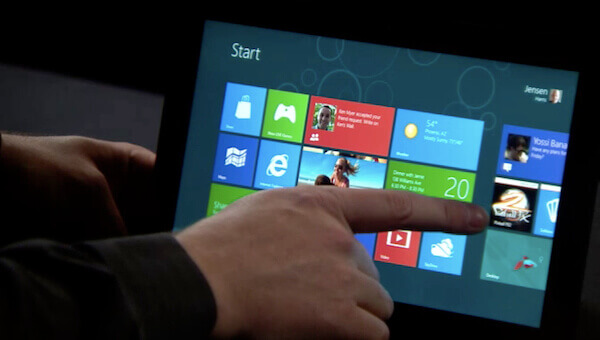
Windows 8 is almost here! Microsoft released the “Consumer Preview” edition of their eagerly anticipated, multiple-front attack at the tablet and desktop markets this past month as a free preview for everyone to dig into. You can download a free copy of the preview from Microsoft’s website, here. What follows is my initial impression of Windows 8 from a software developer’s viewpoint.
It’s fast!
Despite the fact Windows 8 is running a newer, flashier user-interface dubbed “Metro” on top of the familiar Windows 7 user-interface, everything moves along at a similar pace (if not faster) compared with Microsoft’s previous generation Windows 7. Both newer, Metro-based applications and regular Windows Forms applications load up quickly and are just as responsive to user interaction as is expected.
Metro is fun to use – even with a keyboard!
Being a software developer, I try to keep my hands off of my mouse as often as possible. As anyone who uses a computer for their entire work-day knows, moving a hand between the mouse and keyboard can slow you down considerably. The Metro UI includes simple keyboard shortcuts for navigating the Metro dashboard as well as switching between running applications. The Windows key on your keyboard will become ubiquitous with daily usage of your machine.
Windows 8 tablet PCs are going to take the world by storm.
You can quote me on that. I am truly excited for the opportunity to replace my daily work machines with a single, portable device that accesses all points of my workflow (coding, designing, communicating and testing) and is equally as useful as a tablet and a desktop machine. Since Windows 8 is essentially a full-fledged desktop operating system with a touch-interface overlay, it therefore supports all of your regular input and output devices (think: external keyboards and mice, additional displays and USB devices (such as your iPod, memory sticks, your printer, etc)). Of course, it all boils down to the device offerings that get created – and there’s no doubt I would opt for a tablet powered by at least a Core i7 CPU over an ARM-based CPU – but I can safely say that I look forward to docking a Windows 8 tablet at my desk in the morning and then taking it with me at the end of the day.
Notifications are welcome.
I absolutely dig the new notification system that is the backbone of the Metro UI. I can’t wait for more applications to be built as native Windows 8 apps so that they can share status notifications and interact with other applications. For instance, I think it would be an outstanding feature to have a Metro tile feature the latest check-in status for source code management systems. The best part about the notifications system is that micro-apps can be built to facilitate data exchange between the Metro UI and existing legacy applications that don’t have native Metro support.
The bad.
There are always points against every piece of software; mind you, Windows 8 doesn’t have too many points against it just yet. Microsoft has taken great strides in the past several years after the release of Windows 7 to usher in a truly new way to interact with our PCs. The only problems I faced during my initial testing were surrounding the upgrade process. I upgraded a virtual Windows 7 installation to Windows 8 and had a few problems getting previously-working applications to behave correctly in Windows 8. For the most part, everything worked, but there were some issues surrounding my use of Google Chrome as my default web browser and the new Metro Internet Explorer 10 completely disappearing from the Metro dashboard until I made it the default browser. That’s just poor form, in my opinion, as it caused a lot of confusion that I’m sure will translate to support headaches on Microsoft’s end. Those issues aside, I am very happy with Windows 8 so far. I haven’t gone so far as to replace my main desktop machine with an installation of Windows 8, but I’m not too far away from pulling the trigger on that one.
Now that the dust has settled…
…I’m happy to report that Windows 8 is enough of an upgrade to make this developer happy to choose it as his daily operating system of choice. Windows 7 has served me quite well in the past few years and I have always spoken very highly of it, but the times they be a changin’, and Windows 8 appears poised to take on those changes with grace and dignity.
Windows 8 rocks. You can quote me on that, too.